Chips

Chips are compact elements that allow users to refine content, such as filtering categories or tags, with immediate visual feedback.
Use the chip-selectable and chip-dismissible CSS classes with the ARIA state required by each interaction pattern.

Show code
import { useState } from 'react';
const options = ['Hybrid', 'Electric', 'Petrol'];
export function ChipSelectable() {  const [selected, setSelected] = useState<string[]>([]);
  const toggle = (option: string) => {    setSelected((prev) =>      prev.includes(option)        ? prev.filter((s) => s !== option)        : [...prev, option],    );  };
  return (    <div className="flex gap-8">      {options.map((option) => (        <button          key={option}          type="button"          className="chip-selectable"          aria-pressed={selected.includes(option)}          onClick={() => toggle(option)}        >          {option}        </button>      ))}    </div>  );}
Selectable chip
Section titled “Selectable chip”Use chip-selectable on a <button>. Toggle selection with aria-pressed.
Small size
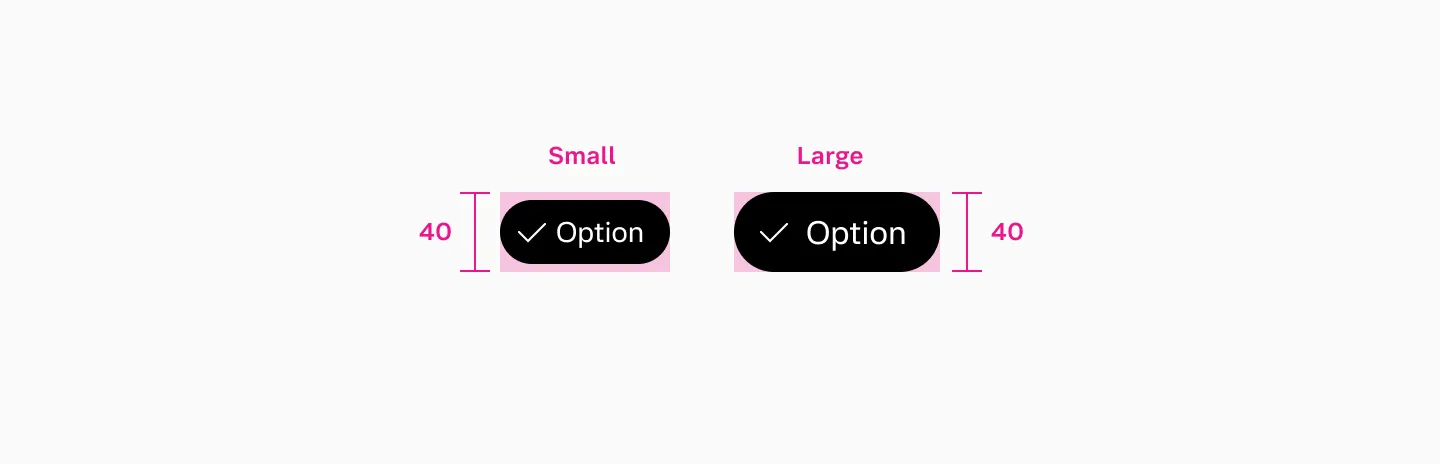
Section titled “Small size”Add data-size="small" for a compact variant.
Single selection (radio)
Section titled “Single selection (radio)”For mutually exclusive selection, add role="radiogroup" on the container and role="radio" on each button. Use aria-checked instead of aria-pressed.
Dismissible chip
Section titled “Dismissible chip”Use chip-dismissible on a <div> containing text and a dismiss button. The dismiss button must use slot="dismiss" for correct styling. Use IconButton from @volvo-cars/react-icons with variant="clear" and bleed for the dismiss action.
For a set of removable items, add role="list" on the container and role="listitem" on each chip.
Loading
Section titled “Loading”Set data-loading="true" and aria-busy="true" on the chip container. The dismiss button is automatically hidden and a <progress class="spinner"> takes its place.
Accessibility
Section titled “Accessibility”Key responsibilities from the WCAG audits (selectable, dismissible):
- Use the right ARIA pattern:
aria-pressedfor multi-select toggles,aria-checkedwithrole="radio"for single-select. Dismissible chips need a dismiss<button>with a descriptivearia-label(e.g. “Remove EX90”). - Loading states: use
aria-busy="true"and a<progress>element witharia-labelso screen readers announce the loading state. - Keyboard: all chips must be focusable and activatable via Enter or Space. Tab order should follow visual order (left-to-right, top-to-bottom).
- Contrast: text and background contrast in both selected and unselected states needs verification (WCAG 1.4.3, pending audit).
- No unexpected side effects: selecting or dismissing a chip should not cause disorienting changes elsewhere on the page.
- Target size: chip and dismiss button target sizes should be at least
40×40px. The small and large variants both provide a40pxinteraction target.