
Checkbox

An input for choosing from predefined options, either as a standalone toggle or as part of a group where users can select multiple values from a list.
Use Checkbox from @volvo-cars/react-forms, or use a native checkbox styled by @volvo-cars/css.

Show code
import { Checkbox } from '@volvo-cars/react-forms';
export function CheckboxBasic() {  return (    <Checkbox name="updates" label="Send me product updates" defaultChecked />  );}
CSS-only usage
Section titled “CSS-only usage”@volvo-cars/css styles native <input type="checkbox"> elements automatically. No class needed. If you add any class to the input, include the checkbox class to keep design system styles.
Show code
<div class="flex flex-col gap-16"> <div class="flex-row"> <input type="checkbox" name="updates" id="updates" value="updates" /> <label class="ml-8" for="updates">Send me product updates</label> </div> <div class="flex-row"> <input type="checkbox" name="terms" id="terms" value="terms" checked /> <label class="ml-8" for="terms">I agree to the terms</label> </div> <div class="flex-row"> <input type="checkbox" name="offers" id="offers" value="offers" disabled /> <label class="ml-8" for="offers">Get special offers</label> </div></div>Controlled and uncontrolled
Section titled “Controlled and uncontrolled”Uncontrolled
Section titled “Uncontrolled”Pass defaultChecked to pre-select a checkbox without managing state.
Controlled
Section titled “Controlled”Pass checked and onChange when you need to read or drive the state externally.
Validation
Section titled “Validation”Set errorMessage to display an inline error and mark the checkbox invalid. The error is hidden when the checkbox is disabled. For CSS-only usage, set aria-invalid="true" on the input and link an error message with aria-describedby.
Disabled
Section titled “Disabled”Set disabled on the checkbox to prevent interaction. The adjacent label stays visible but no longer receives pointer or keyboard focus.
Indeterminate state
Section titled “Indeterminate state”The indeterminate prop shows a visual “partially selected” state. Useful for parent/child checkbox hierarchies. It is visual-only and does not affect the submitted value; you manage the checked state of each child yourself.
The hint prop adds a description below the label, linked via aria-describedby. Use hints for supplementary context, and keep the label as a complete plain-text description of the choice. Place links in the hint. See Rich hints for the shared React API and Markdown support. For CSS-only usage, wrap the label and hint in a flex-col stack-4 container and use micro text-secondary for the hint text.
Spacing
Section titled “Spacing”Group checkboxes in a vertical list with 16px between each item. Vertical stacking is the preferred orientation and scans best for longer lists. A horizontal layout works for a short set, such as two or three options.
Accessibility
Section titled “Accessibility”Key responsibilities from the WCAG audit:
- Label every checkbox:
Checkboxrequires alabelprop. For CSS-only, pair each<input>with a<label for>. - Keep labels plain text: add any required links in the
hintinstead. - Error association: use
errorMessage(React) oraria-invalid+aria-describedby(CSS-only) to communicate errors. - Pointer target size: the checkbox control is smaller than 44×44 px, but the adjacent label extends the clickable area.
- Status messages: VoiceOver in Safari has known issues announcing error messages on checkboxes (WCAG 4.1.3). Test with multiple screen readers.
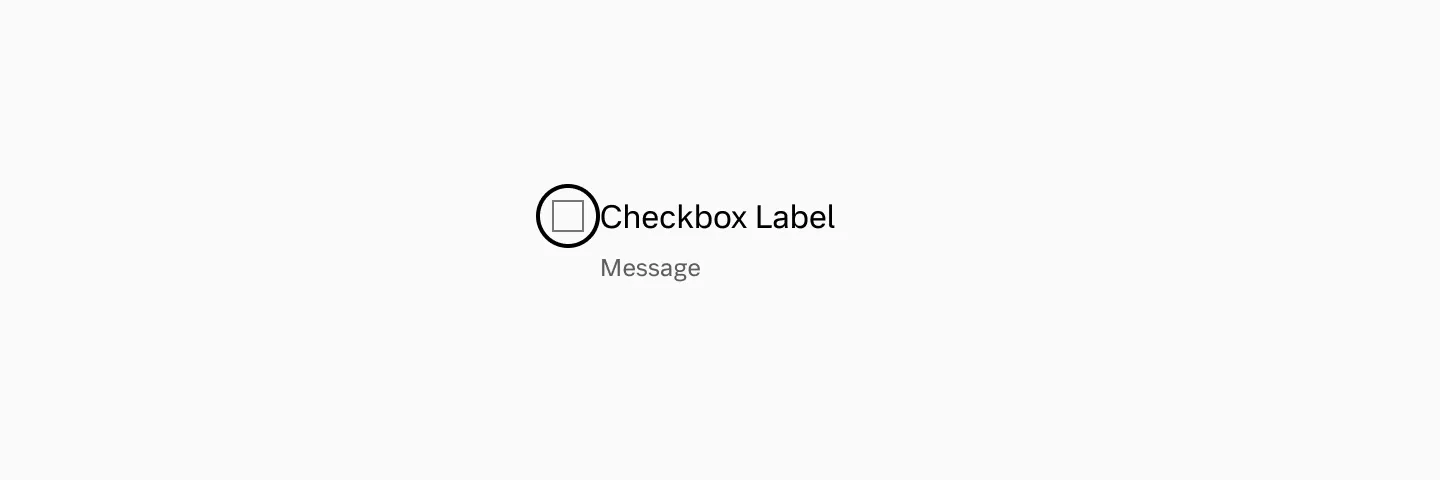
Keyboard focus
Section titled “Keyboard focus”The keyboard focus indicator outlines the checkbox control itself, not the label.
| Prop | Type | Required | Default |
|---|---|---|---|
name | string | ✓ | - |
| The name of the input to use when submitting the form. | |||
label | string | ✓ | - |
| Concise label for the checkbox. Labels should not contain HTML, add any required links in the `hint` instead. | |||
value | string | - | on |
| The value of the checkbox that will be submitted with the form data. @see https://developer.mozilla.org/en-US/docs/Web/HTML/Element/input/checkbox#value | |||
required | boolean | - | - |
| Makes the checkbox required. | |||
errorMessage | string | - | - |
| Set the error message of a checkbox and mark it invalid. | |||
aria-invalid | boolean | - | false |
| Force the checkbox to be invalid. | |||
checked | boolean | - | - |
| Whether the checkbox is checked. Makes the input controlled. | |||
onChange | ChangeEventHandler<HTMLInputElement, Element> | - | - |
| Fires when the input is checked or unchecked. | |||
defaultChecked | boolean | - | - |
| Whether an (uncontrolled) checkbox is checked by default. | |||
indeterminate | boolean | - | false |
| Indicates if the checkbox is in an indeterminate state, often used to show a "partially selected" state (e.g., when some child checkboxes are selected). This state is visual-only and does not affect the checkbox's submitted value. | |||
hidden | boolean | - | - |
id | string | - | - |
title | string | - | - |
dir | string | - | - |
lang | string | - | - |
slot | string | - | - |
translate | "yes" | "no" | - | - |
className | string | - | - |
style | CSSProperties | - | - |
tabIndex | number | - | - |
onPointerDown | PointerEventHandler<Element> | - | - |
onPointerEnter | PointerEventHandler<Element> | - | - |
onPointerLeave | PointerEventHandler<Element> | - | - |
onPointerMove | PointerEventHandler<Element> | - | - |
onPointerUp | PointerEventHandler<Element> | - | - |
disabled | boolean | - | false |
| Disables the input. Use sparingly as it can be non-obvious to users why an input has been disabled. Prefer showing validation messages and hints instead. | |||
autoFocus | boolean | - | false |
| Gives the input focus on page load. Use sparingly as it can be confusing to screen-reader and mobile users. | |||
readOnly | boolean | - | false |
| Makes the input read-only. Use sparingly, it's often preferred to present the data as regular text or in a table instead. | |||
form | string | - | - |
| Id of a form element that this input should be associated with. Defaults to the containing form element. | |||
hint | ReactNode | - | - |
| Additional hint or description. Supports text, links and block content such as paragraphs or Markdown output. | |||
enterKeyHint | "done" | "go" | "next" | "previous" | "search" ... | - | - |
| Hint the browser about what label to show for the Enter button on mobile keyboards. | |||
aria-describedby | string | - | - |
aria-labelledby | string | - | - |
onInvalid | FormEventHandler<HTMLInputElement> | - | - |
| Fires if the input fails validation on form submit. | |||
onFocus | FocusEventHandler<HTMLInputElement> | - | - |
onBlur | FocusEventHandler<HTMLInputElement> | - | - |
onKeyDown | KeyboardEventHandler<HTMLInputElement> | - | - |
onKeyUp | KeyboardEventHandler<HTMLInputElement> | - | - |